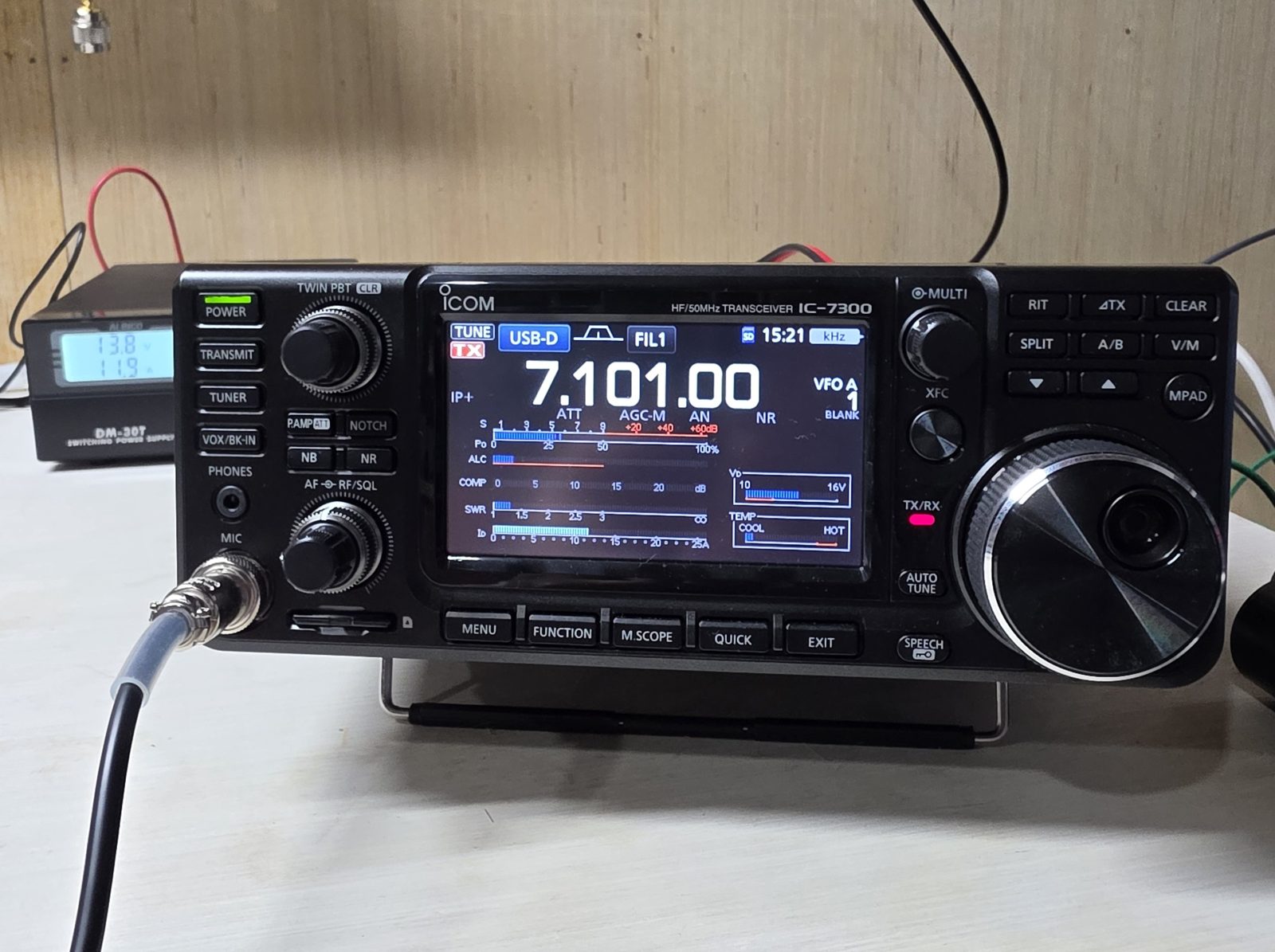
Free guide. Everything below happened on my own station. Nothing here is "should work."
Who this is for
You have an Icom IC-7300 on one USB cable. Winlink Express and VARA HF are installed. The Telnet test passes. CAT works, because the radio jumps frequency when you pick a gateway. But when VARA tries to transmit, the radio never keys, or it keys and then falls apart.
That was me in September 2026. It took me several evenings. Here's the short version so it takes you one.
Honestly, it was very frustrating. I'd found the net call on the WV amateur radio webpage and was excited to check in, and I couldn't get VARA or Winlink to work at all. Just days before, I'd been working Europe and even Australia on FT8 with the same setup.
The fix that keyed my radio: PTT = CI-V
Every older guide says to set PTT to RTS on a COM port. On a single-USB-cable IC-7300 that's a dead end.
Why: one USB cable gives you one COM port (mine was COM3), and CAT control is already using that port. VARA can't open COM3 a second time to flip RTS. Either it quietly fails, or it toggles a line that isn't connected to anything. You get no error. The radio just doesn't key.
The fix:
- Open the VARA HF Winlink session window. (Radio Setup lives inside the session window, not in Winlink Express's main Settings menu. That alone cost me 20 minutes.)
- Go to Settings → Radio Setup.
- Under PTT Port (Optional), set "Serial Port to Use" =
CI-V.- This dropdown lists things like External, CI-V and radio models, not COM ports. That's why it's easy to skip past.
CI-Vtells VARA to key the radio with a CI-V command over the control port it already has.
- Leave RTS and DTR unchecked, both on the PTT section and on the Radio Control Port.
- Radio Control Port: COM3 (your CP210x port) @ 115200, Icom address 94.
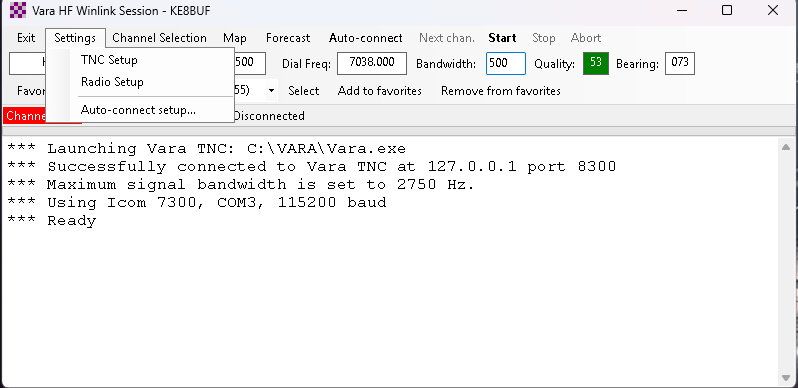 Radio Setup lives in the VARA session window's Settings menu, not in Winlink Express.
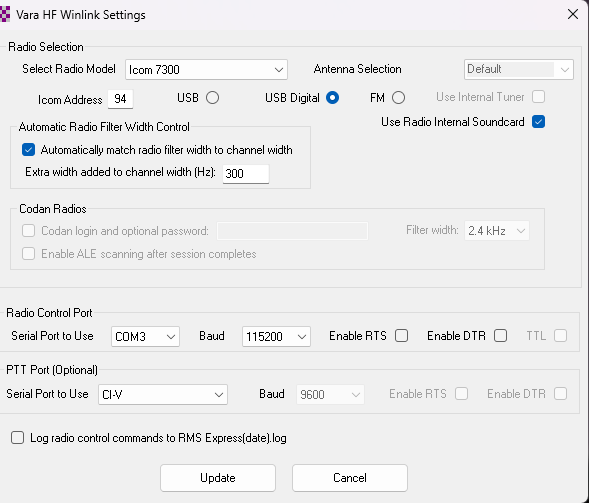 My working Radio Setup: COM3 @ 115200, RTS/DTR off, PTT port = CI-V.
How I knew CI-V would work: my radio keyed fine by hand (mic PTT), and WSJT-X keyed it through CAT. So the radio already accepted a CI-V transmit command. VARA just needed to be told to use it.
My verified working settings (copy these, then adjust)
VARA HF → Radio Setup
| Setting | Value |
|---|---|
| Radio | Icom 7300 |
| Icom address | 94 |
| Mode | USB Digital |
| Use Radio Internal Soundcard | ✅ checked |
| Radio Control Port | COM3 (Silicon Labs CP210x) @ 115200, RTS/DTR off |
| Automatically match radio filter width | ✅ checked (+300 Hz extra) |
| PTT Port | CI-V |
VARA HF modem window → SoundCard
| Setting | Value |
|---|---|
| Input | Microphone (USB Audio CODEC) |
| Output | Speakers (USB Audio CODEC) |
| Channel | L+R |
| Drive | -15 dB (the -5 default was too hot on my rig) |
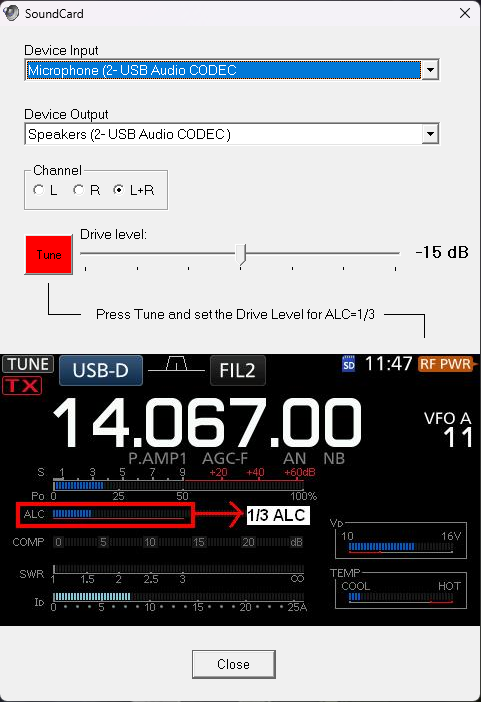 VARA SoundCard: USB Audio CODEC in and out, L+R, drive at -15 dB for about 1/3 ALC.
IC-7300 front panel
| Setting | Value |
|---|---|
| Mode | USB-D |
| Filter / AGC | FIL1 / AGC-M |
| RF Power | 40% (~40 W) |
| MENU → SET → Connectors → DATA MOD | USB ⚠️ |
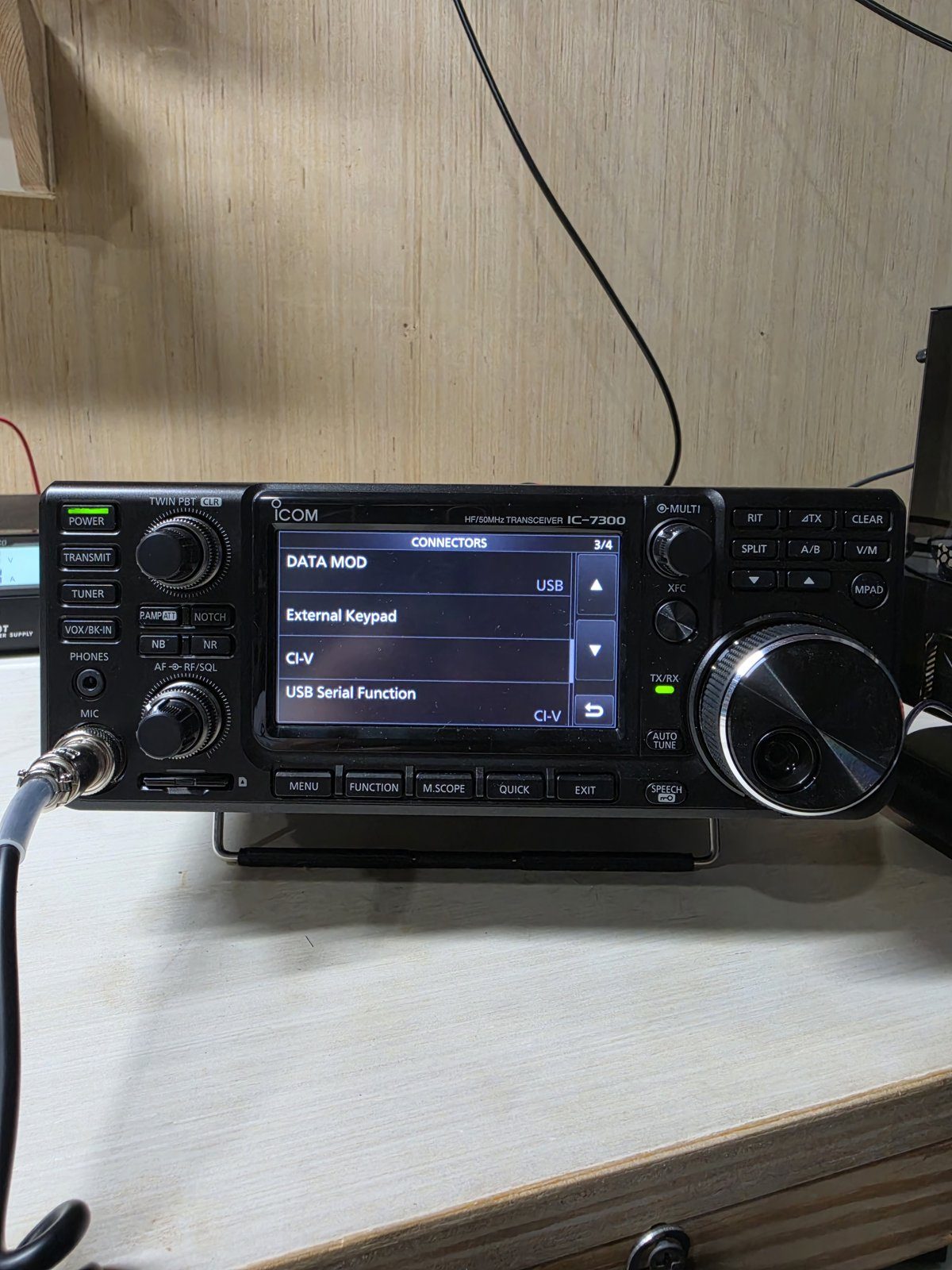 MENU → SET → Connectors: DATA MOD reads USB.
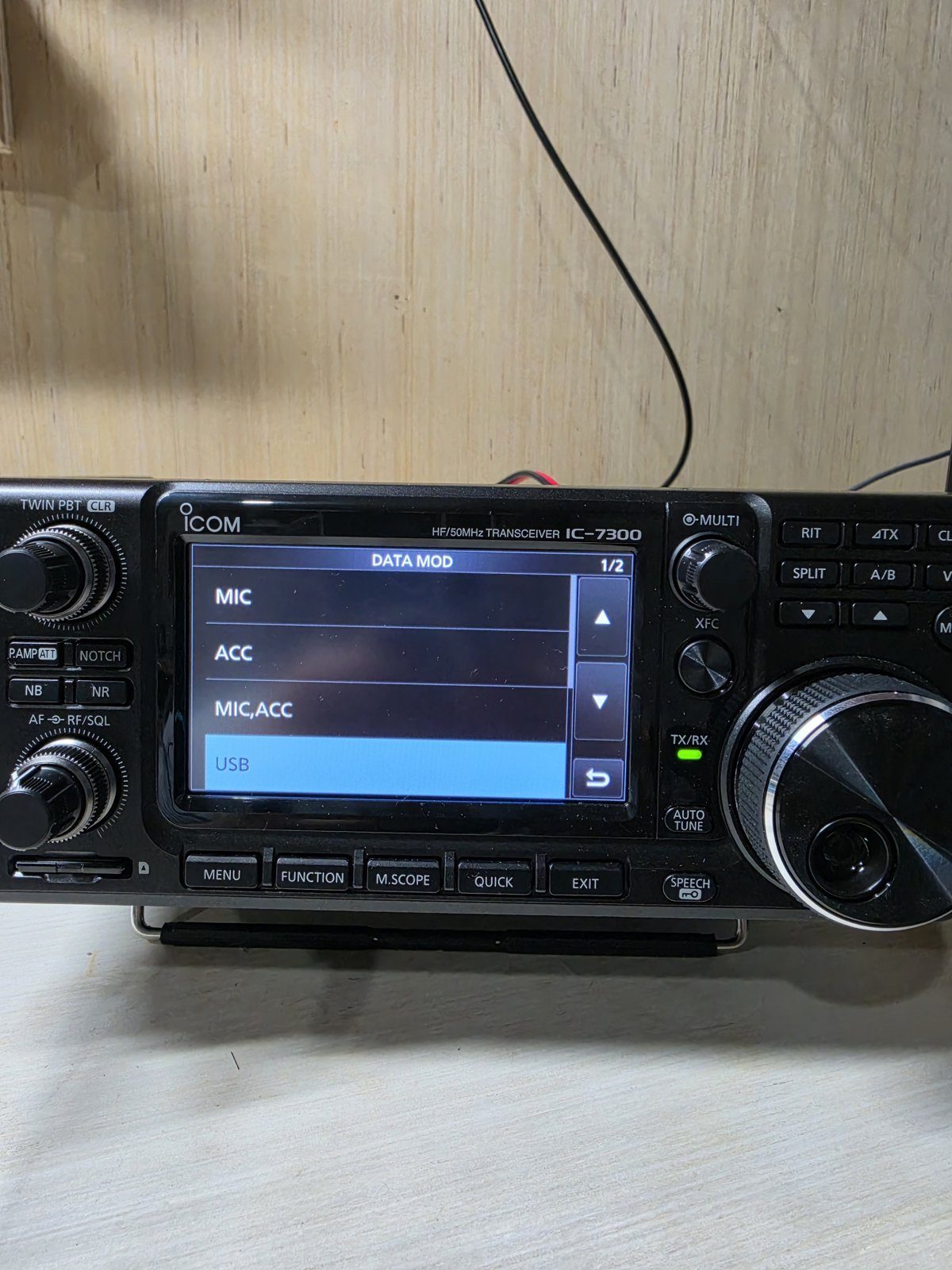 The DATA MOD choices. Pick USB, not ACC.
Drive target: about 1/3 of the ALC bar on transmit. VARA wants a little ALC. FT8 wants none. Don't mix up the two rules.
The other traps I hit, in the order I'd check them
1. Check DATA MOD = USB, but don't stop there if you still see zero watts. In USB-D mode the 7300 takes data audio from wherever DATA MOD points. If it points at the ACC jack, the radio keys up (TX light red) and transmits silence. Set it to USB. (Your voice setting is separate, under DATA OFF MOD, and this doesn't affect it.) Honest note: I got zero watts twice, from two different causes. The first time it really was DATA MOD: it wasn't on USB, and setting it fixed it. The second time DATA MOD was already right, and it was a bad USB cable (trap #6). Check DATA MOD first because it's free, but if it's already on USB, go straight to the cable.
2. "Another copy of VARA is running from this folder." Don't start VARA yourself. Let Winlink Express launch it. If you open it by hand and then start a session, you get two copies fighting, and the TCP link goes from green to red. Fix: click OK on the error, close the copy you opened, exit the session, then reopen the session.
3. Another program is holding the COM port. If WSJT-X or your logger (Log4OM in my case) is running, it may own COM3. Close them before Winlink.
4. "Channel Busy": VARA won't transmit. VARA won't key while it thinks the channel is busy (red in the status bar). Wait for a steady green "Channel Free." That's a feature, not a bug.
5. Windows audio "enhancements."
Run mmsys.cpl. On both the Playback (Speakers) and Recording (Microphone) USB Audio CODEC
devices (not your headset), check the Advanced tab. Mine are set to 48000 Hz with audio
enhancements off. Audio enhancements caused random sound errors and crashes on my station until I
turned them off. (Exclusive mode is still at the Windows default, checked, on my station, and VARA
works fine with it.)
Watch out: Windows keeps turning enhancements back on. On my PC the "Disable all enhancements"
box on the Speakers side comes back unchecked, and I re-check it before every session. Make it
part of your pre-flight.
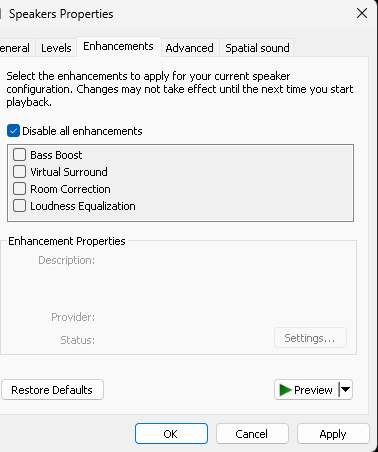 Speakers (USB Audio CODEC) → Enhancements: "Disable all enhancements" checked. Windows keeps unchecking it.
6. The intermittent gremlin: the USB cable itself. This is the one that fooled me longest. Power would surge, ALC would peg, output would drop to zero, CAT would cut out, and the USB Audio CODEC would vanish from Device Manager. I chased the power supply and rebuilt my whole DC harness in copper. My DC wiring was fine.
I proved it with a 60 W incandescent light bulb as a test load, keyed for 10 seconds or less at a time. (A bulb is a crude load, not a real 50-ohm dummy load. Keep the keys short.) An FM carrier pulling 11.8 A held rock steady, but a data transmission at lower current still wobbled. I tuned and keyed both VARA and FT8 into that bulb to test the cable and every setting on the PC and the radio. If the problem got worse with less current, it wasn't the supply. It was the USB data path: a cheap USB-B cable plus RF getting in.
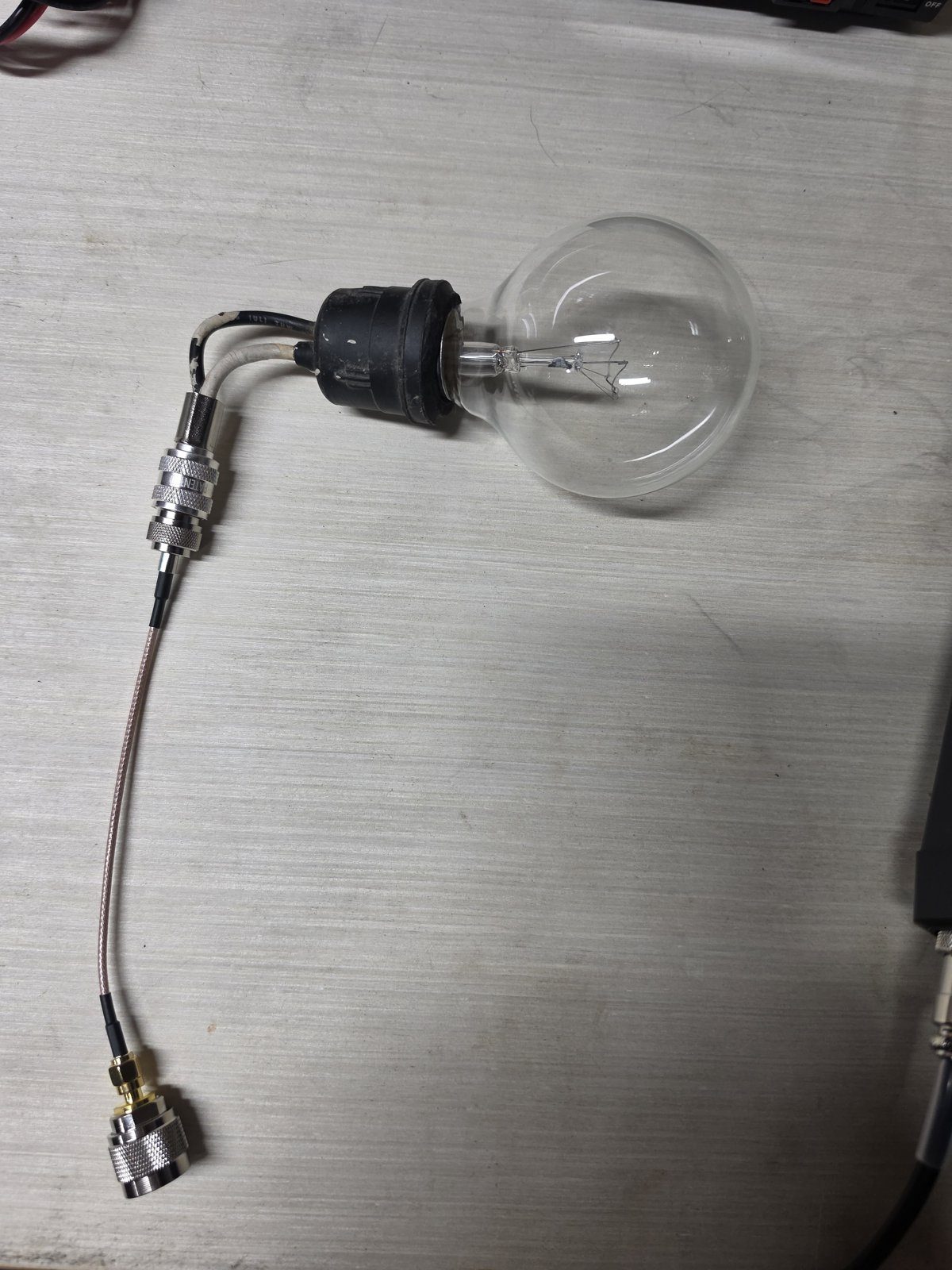 My light-bulb test kit: a 60 W clear incandescent on a coax pigtail. Short keys only.
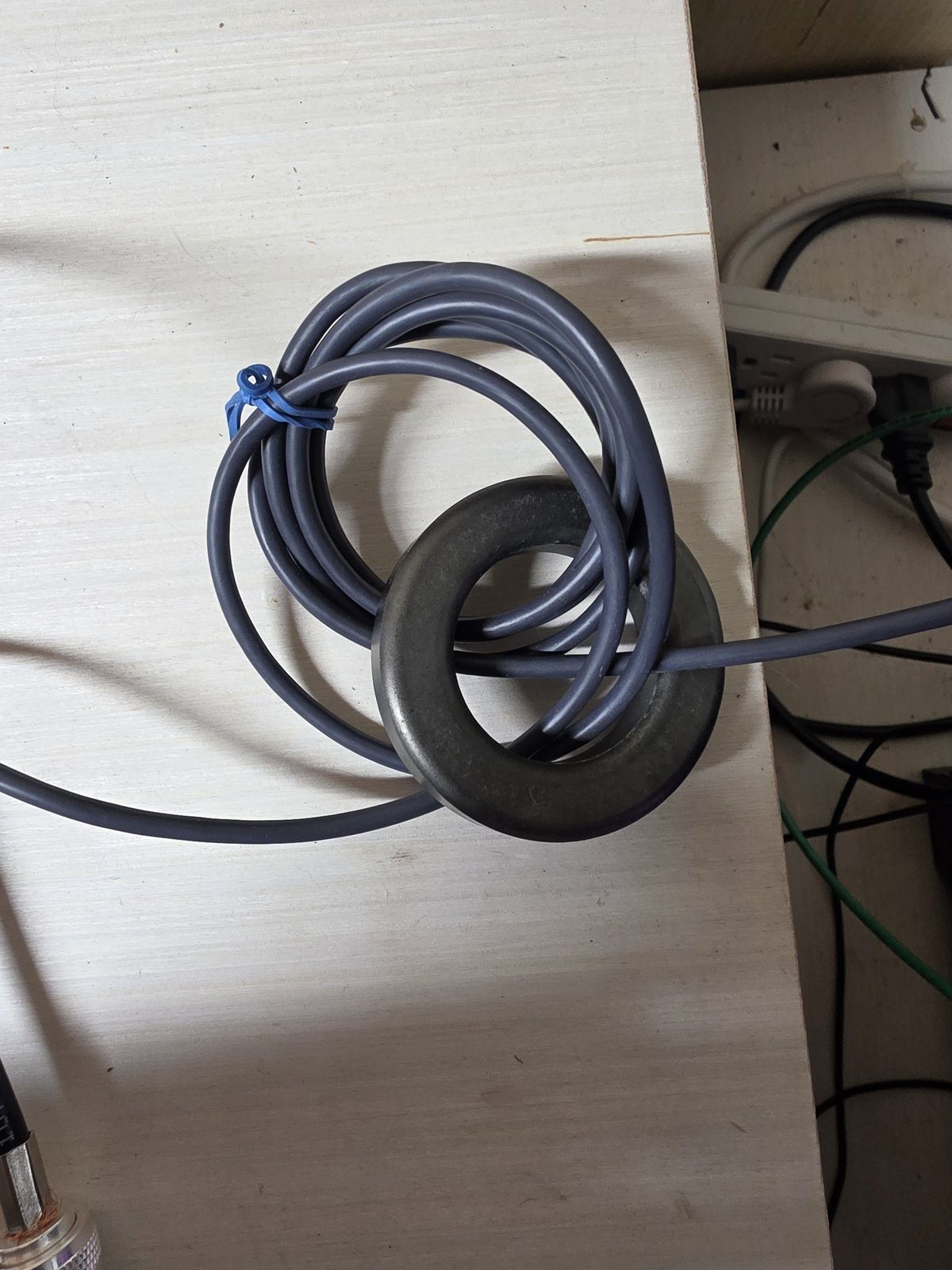 The new USB-B cable with its 7-turn mix 31 choke.
What fixed it: a new USB-B cable, with the clip-on ferrites I'd been using swapped for a 7-turn common-mode choke (mix 31 toroid) at the radio end (every cable on my station is choked: mix 31 toroids on HF), plugged straight into a rear PC port. No front-panel ports and no monitor hub. Also turn off USB selective suspend in Windows power settings, and power the radio on before the PC apps.
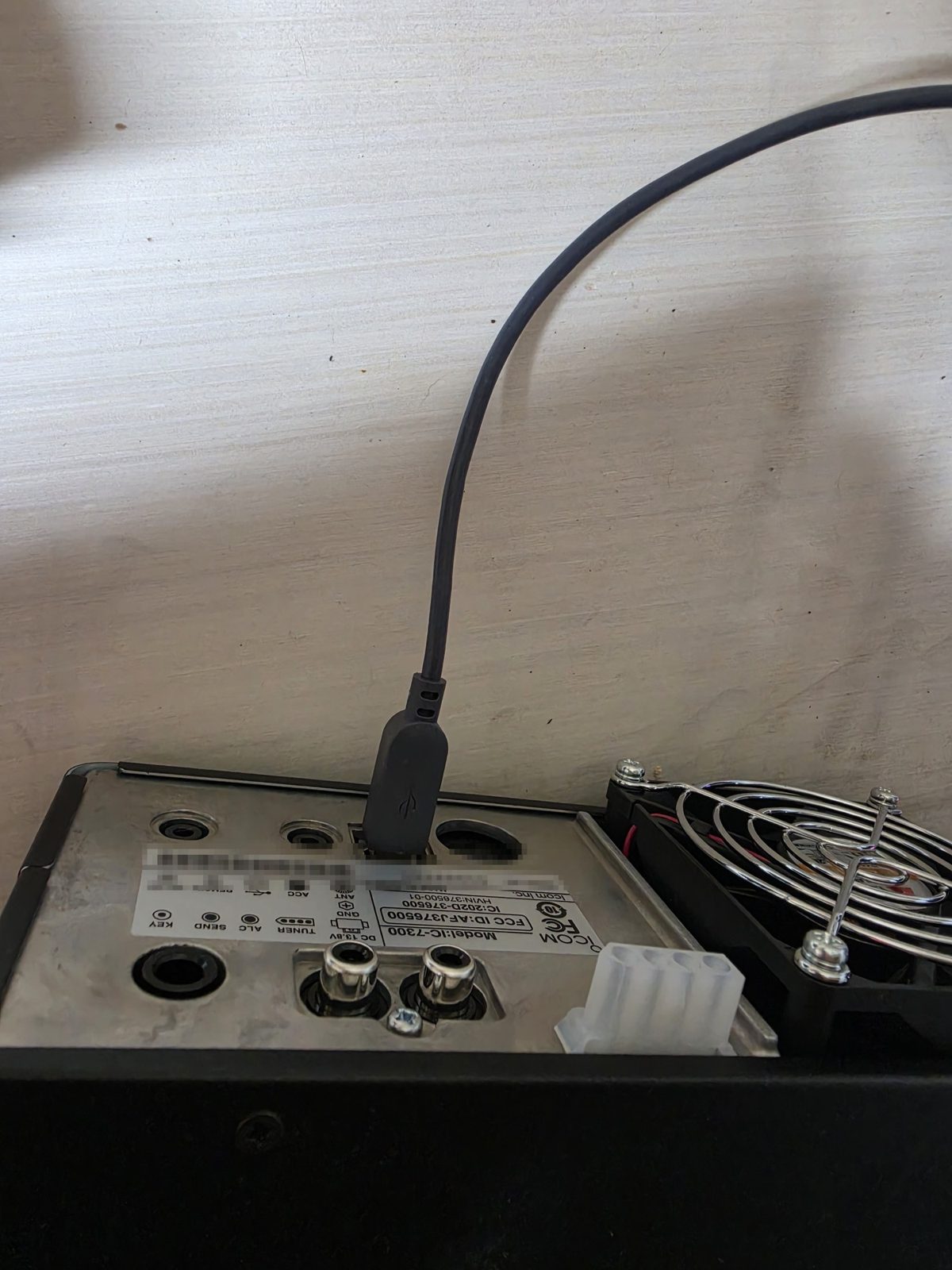 Radio end: USB-B into the 7300's rear port (label blurred).
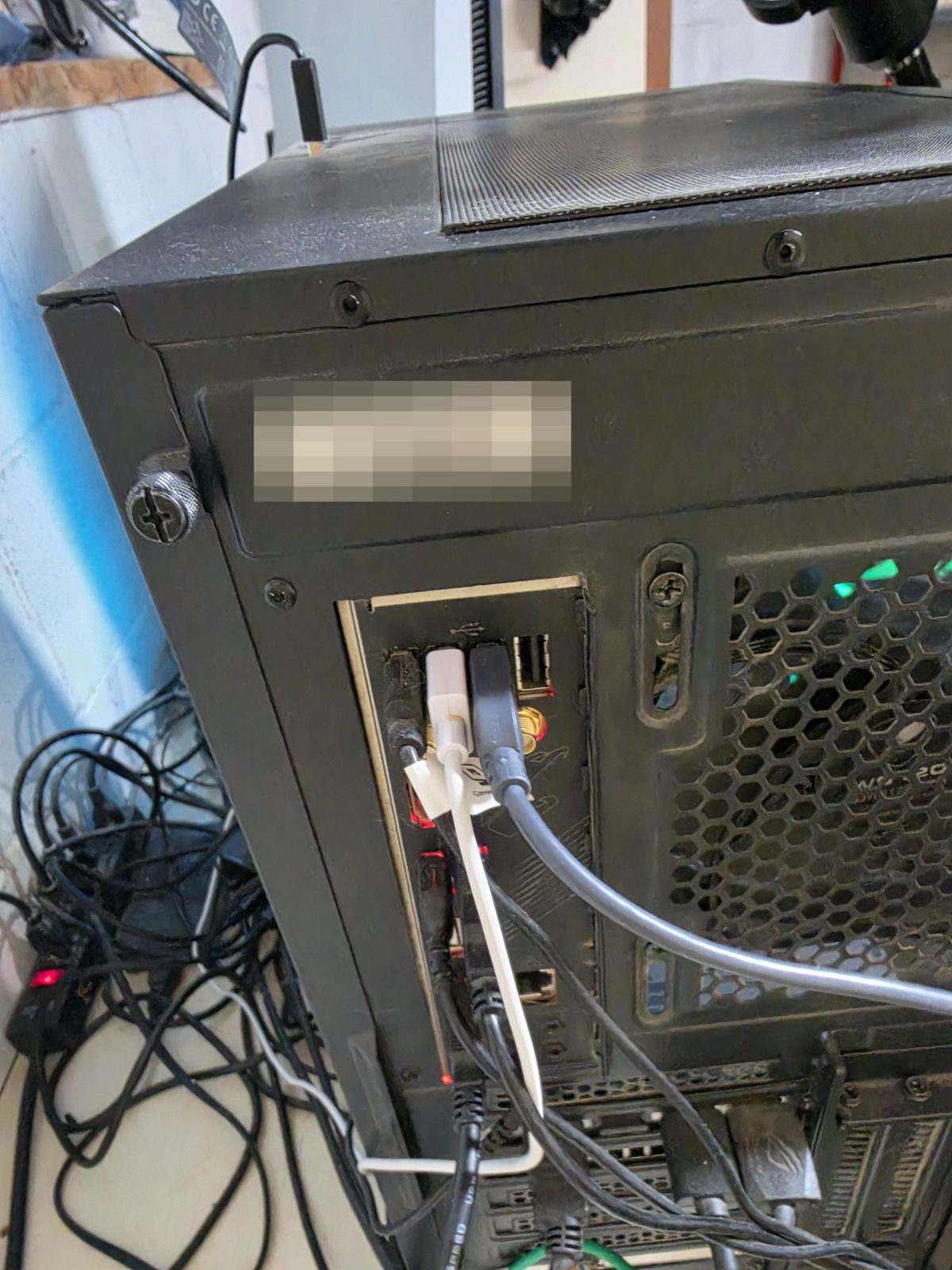 PC end: straight into a rear motherboard port. No hub, no front panel.
That cable had worked for two or three FT8 sessions just days earlier, so I ruled it out. Then I went through a whole pile of troubleshooting and settings changes, and finally built a test kit out of a light bulb, before I pinpointed the USB cable. One trip to the local Walmart fixed it, so far.
Your first connect: what "success" looks like
- Use the HF Channel Selector, pick a gateway with a high reliability score, double-click it, then Start. My first good one was KQ4CAA on 40m (reliability 86, about 270 miles).
- A Winlink session is short on purpose. Connect, swap mail, disconnect. Mine took about a minute. A quick disconnect means it worked, not that the connection dropped. I thought it had failed the first time.
- Put your message in the Outbox before you connect. If the log shows
FS Yand "Sent 1 message," the gateway took it. - Proving you can receive over RF. This one fooled me. Don't test by messaging yourself.
I sent myself three tests from Winlink Express, addressed both as
KE8BUFand as the fullKE8BUF@winlink.org. The gateway took every one, and not one ever came back down. Tests to SERVICE never came back either. What worked: from my regular email, send toYOURCALL@winlink.orgwith a subject that starts with//WL2K. That prefix gets past Winlink's spam whitelist. Wait about 5 minutes, then connect over RF. Mine came down from KE8LVA (160 miles, 40m): the log showedFC EM, thenFS Y, then "Messages Received: 1." - Pick a gateway by today's path, not yesterday's. Click "Update Via Internet" in the Channel Selector first. My first-choice gateway kept stalling in bad weather. A closer one with a better path score connected first try.
- Reading the log:
FFmeans "I have nothing to send." If the gateway then answersFQstraight away, there was no mail waiting for you. It isn't an error. - I'm running the free, unregistered VARA HF. It works fine for mail. The gateway tells you sessions are capped at 20 minutes, and it stays at the lower speed levels.
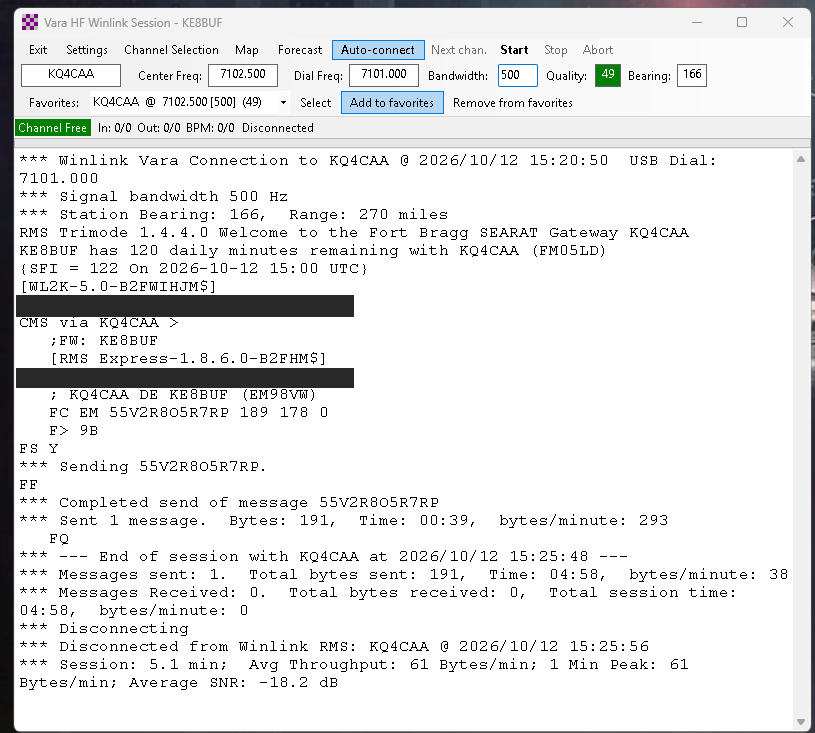 Success looks like this: KQ4CAA, 270 miles, FS Y, "Sent 1 message." Login lines masked.
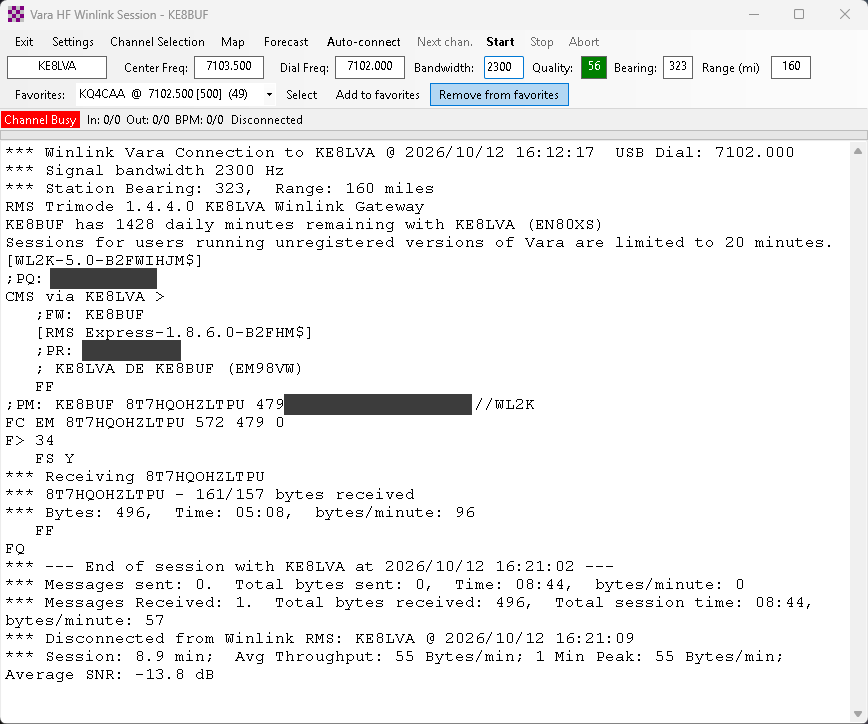 Proven RF receive: a //WL2K email came down from KE8LVA. Login lines and my email address masked.
Still stuck?
Comment wherever you found this, or find me on QRZ (K8FQ). If it's a 7300 on one USB cable, there's a good chance I've already hit your problem.
This guide is free, and it stays free. If it saved you an evening, you can toss a few bucks in the tip jar. Tip jar $0 is fine too. Pass it on to the next ham who's stuck.
More guides from my station: mountaineertech.io/guides
Tested on my own station: IC-7300, 133-ft 80m end-fed half-wave, Winlink Express 1.8.6 + VARA HF 4.9. My troubleshooting notes were organized and proofread with AI tools. The station time, mistakes and fixes are all mine. Your radio, cable and PC may behave differently.
73, Eric K8FQ